You can pay for gigabit internet and still have lousy Wi-Fi in the room where you actually need it. That is the frustrating part. A fast internet plan does not do much good if an old router, a difficult floor plan, or a garage door gets between you and a reliable connection.
So, do you need a traditional wireless router or a whole-home mesh Wi-Fi system? Start with your space, not the biggest number on the box. A good router can be plenty for a smaller home. Mesh makes more sense when one location cannot deliver consistent coverage everywhere.
TP-Link sponsored this comparison. I tested the Archer AXE75 traditional router and the Deco XE75 mesh system in my own home, and both support Wi-Fi 6E. They illustrate two different ways to solve the same problem: getting usable Wi-Fi where you need it.
Key Takeaways
- A centrally located traditional router may be enough for a smaller home or office.
- Mesh helps distribute coverage across larger homes, multiple floors, and difficult layouts.
- Wi-Fi 6E adds 6 GHz spectrum and is available in both standalone routers and mesh systems.
- Router placement and physical barriers matter alongside square footage and internet plan speed.
Why Your Wi-Fi Setup Matters
Home internet is a long way from dialing into AOL and waiting for that familiar mail announcement. We have 4K streaming, 8K content, online gaming, augmented reality, virtual reality, and households full of connected devices.
You can buy an inexpensive 4K television, but that does not mean the old router in your living room is ready to keep up. If your connection keeps buffering, getting pixelated, or dropping out, the internet plan is only one part of the picture.
There are two questions worth separating:
- Performance: Can your wireless equipment handle the speeds and activities you need?
- Coverage: Can that connection reliably reach the rooms where you use it?
If all you do is check email and browse websites near the router, your needs are pretty modest. If people are streaming, gaming, and working throughout a spread-out house, the setup deserves more thought.
Traditional Router vs. Mesh Wi-Fi: The Basic Difference
A traditional router provides Wi-Fi from one location
A standalone wireless router is your main Wi-Fi source. You connect it to your modem, and it broadcasts throughout the surrounding area.
The Archer AXE75 is the traditional router I tested. It is a tri-band, six-stream, AXE5400-class Wi-Fi 6E model with six external antennas. That is a lot of antennas, but the important point is that all of its coverage still starts from one physical location.
Its antennas and beamforming capabilities help deliver that wireless connection. Antenna orientation matters, but beamforming is not simply a matter of pointing an antenna like a flashlight toward a bedroom. For the router-versus-mesh decision, the bigger issue is whether one location can adequately serve your entire space.
Mesh spreads coverage across multiple locations
A mesh Wi-Fi system uses multiple units placed around your home. Instead of asking one router in the living room to reach every corner, you distribute the Wi-Fi connection across several locations.
Think of it as overlapping coverage areas. One unit serves part of the house, another extends coverage toward the kitchen or garage, and additional units can help reach other areas as needed. Actual coverage is not a perfect circle, but that mental picture explains the basic advantage.
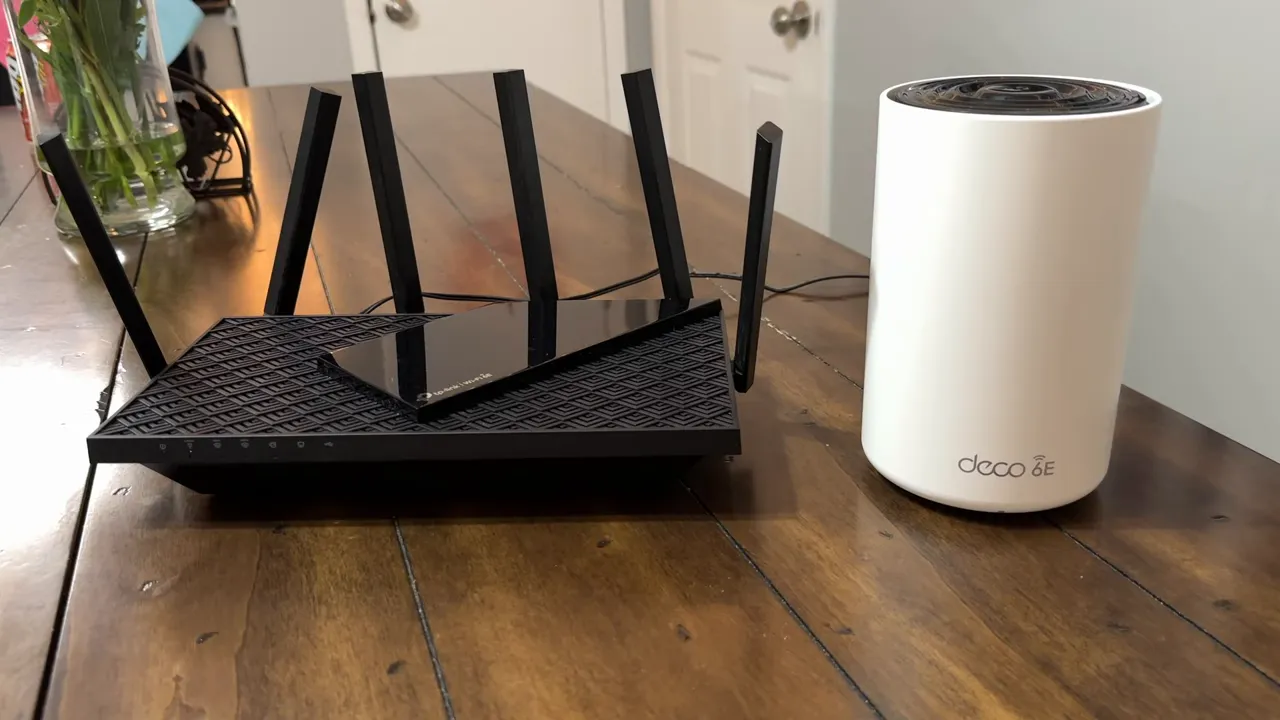
The Deco XE75 package I tested includes two units. You can also start with a single unit and add compatible Deco units later. That scalability is useful if your needs change, you move, or you discover another area that needs better coverage.
When a Traditional Router Is Enough
Not everybody needs mesh. If you have a small house, an apartment, or a small office, a good standalone router may do everything you need.
As a rough starting point, think about a space around 1,000 to 1,500 square feet with a fairly centralized layout. That is not a guaranteed coverage limit. Walls, placement, and the shape of the building can matter just as much as square footage.
A traditional router is a sensible starting point when:
- Your home or office is relatively compact.
- The router can sit near the center of the space.
- Your important rooms already receive a dependable signal.
- You do not have distant rooms or separate work areas that regularly lose connection.
A two-bedroom apartment, for example, probably does not automatically call for a whole-home mesh system. Modern routers can provide substantial coverage. Depending on the building, your phone may even reconnect before you get through the front door.
And if you have just one weak area at the far end of the house, a compatible range extender is another option. Mesh is not the only way to add coverage to an existing setup.
When Mesh Wi-Fi Makes More Sense
Mesh becomes more compelling when your home is large, spread out, has multiple stories, or forces the main router into a poor location.
That last point is easy to overlook. Your internet connection enters the house somewhere specific. The modem goes there, and the router usually ends up nearby. Unfortunately, the place where the cable comes through the wall is not always the best place to broadcast Wi-Fi throughout the house.
Mesh is worth considering when:
- Upstairs bedrooms have weak or interrupted connections.
- The opposite end of the house gets noticeably worse service.
- A garage office or another distant room is difficult to reach.
- The modem sits at one edge of the building.
- You need coverage across several areas and want the ability to expand later.
The same reasoning applies to offices. A small office might be fine with one router. A larger workplace, especially one spread across floors or many rooms, needs coverage from more than one location. The exact network design still depends on the building and its needs.
Why mesh helped in my 2,800-square-foot home
My house has five bedrooms and about 2,800 square feet, and it is spread out. I also built an office in the garage. The living-room router is closer to where my kids spend time, but it is a long way from my workspace.
Distance was only part of the problem. There is also a metal security door between the garage area and the rest of the house, and that was a major obstacle for the direct wireless connection.
A traditional router on its own was not meeting all our needs. Adding mesh coverage in the garage helped get a strong connection out to my office. In my setup, I used the router and mesh equipment together to improve consistency throughout the house.
During testing, I saw wireless downloads in the 300 to 400 Mbps range and uploads around 40 Mbps, which was the upload limit of my plan. My internet service offered gigabit download speeds, but the practical improvement was having a dependable connection throughout the areas we actually use.
That is the real benefit I was looking for: consistent coverage, not just an impressive speed test beside the router.
What 2.4 GHz, 5 GHz, and Wi-Fi 6E Mean
Wi-Fi naming can feel like alphabet soup. There are standards, generation numbers, frequency bands, and product names all competing for attention.
The useful distinction here is that mesh describes how you distribute coverage, while Wi-Fi 6E describes wireless capabilities. You can have Wi-Fi 6E in a standalone router or a mesh system. Both the Archer AXE75 and Deco XE75 support it.
- 2.4 GHz: The familiar lower-frequency band, generally useful for longer reach and getting through obstacles, though with lower speed potential than the higher-frequency options discussed here.
- 5 GHz: Offers higher speed potential, but distance and walls can become more limiting.
- 6 GHz: The additional spectrum made available through Wi-Fi 6E, giving compatible equipment more room to communicate outside the older 2.4 GHz and 5 GHz bands.
That extra spectrum can be valuable for demanding wireless activities such as streaming and gaming. It is not a promise that every connection will be faster, and it does not make physical barriers disappear. You also need a device that supports the 6 GHz band to connect directly on it.
For more background on the standard, the Wi-Fi Alliance’s Wi-Fi 6E overview explains the role of the additional spectrum.
One network name can make things simpler
You may remember choosing between separate network names for 2.4 GHz and 5 GHz. One reached farther, while the other offered a faster connection nearby.
These setups can also provide a unified network experience, so you do not have to think of every band or mesh unit as a separate Wi-Fi destination. The goal is straightforward: get connected and use your devices without constantly managing which connection to choose.
Just remember that adding mesh units is not permission to ignore placement. The units need a useful connection between them. The idea is overlapping coverage, not putting another unit somewhere the network cannot reach effectively.
Archer AXE75 and Deco XE75: Price, Warranty, and My Recommendation
I was impressed with the performance and value of both products in my home. At the time of testing, the pricing discussed was:
- TP-Link Archer AXE75: $199.99 for the standalone Wi-Fi 6E router.
- TP-Link Deco XE75: $269.99 for the two-unit Wi-Fi 6E mesh package.
Both were presented with a two-year warranty. Pricing, promotions, and applicable warranty terms should be checked before purchasing.
My recommendation is pretty simple. For a smaller, centrally served space, start with a traditional router. You do not need to buy mesh just because it exists.
For a larger home, multiple floors, awkward router placement, or a garage office like mine, mesh is worth considering. It gives you more locations from which to deliver coverage instead of asking one router to do everything.
And if you want Wi-Fi 6E, either approach can provide it. Choose the coverage setup that fits your home first, then choose the wireless capabilities that fit your devices and activities.
The original TP-Link promotion included code 10ODYSSEY for the Archer AXE75 and Deco XE75. If you are considering the Deco system, check its current listing and whether the promotional code is still available.


